NeuralSpace API for AI agents: a key straight from the code chat
Коротко о главном (BLUF)
В этом материале мы разбираем ключевые аспекты работы с нейросетями: актуальные модели, практические советы по промптам и примеры генераций. Читайте дальше, чтобы узнать подробности.
You know the drill. You ask an AI assistant to build you a bot or a tiny service — it cheerfully types out code, gets to the part where it needs to call a neural network, and stalls. Now it needs an API key. And the agent has no idea where to get one. So you open three tabs, sign up on some foreign service, try to attach a card it won't accept anyway. Sound familiar?
We got rid of that circus. Now the assistant in the Code section issues a NeuralSpace API key by itself — you just hit "Confirm". And the whole model catalog — Claude, GPT, Nano Banana, Sora, Kling — opens up behind a single key. Paid in rubles. No VPN.
The docs live at /v1/docs — and no login required
Open neuralspace.pro/v1/docs and you see everything at once: which endpoints exist, how to shape a request, what each model costs. The page is public — drop the link to your agent or a colleague, no sign-up needed.
And here's what matters if you've already wrestled with foreign APIs: we didn't invent our own format. Text models reply in the Anthropic format — POST /v1/messages. Had code written for Claude? It'll run almost untouched. There's also /v1/chat/completions in the OpenAI format, for everything built around ChatGPT. Swap the base URL and the key. The rest stays put.
The key is one click away — but nobody issues it behind your back
This is my favorite part. You go into the Code section and tell the assistant: "wire up image generation". It figures out it needs a key and kicks off issuing one.
But the key doesn't just appear silently. A little dialog pops up: what name, what for, plus a warning. Want it — confirm. Don't — decline. We did this on purpose: a key is both money and access, it shouldn't be created without your say-so. The decision always stays with a human, even when an agent asks.
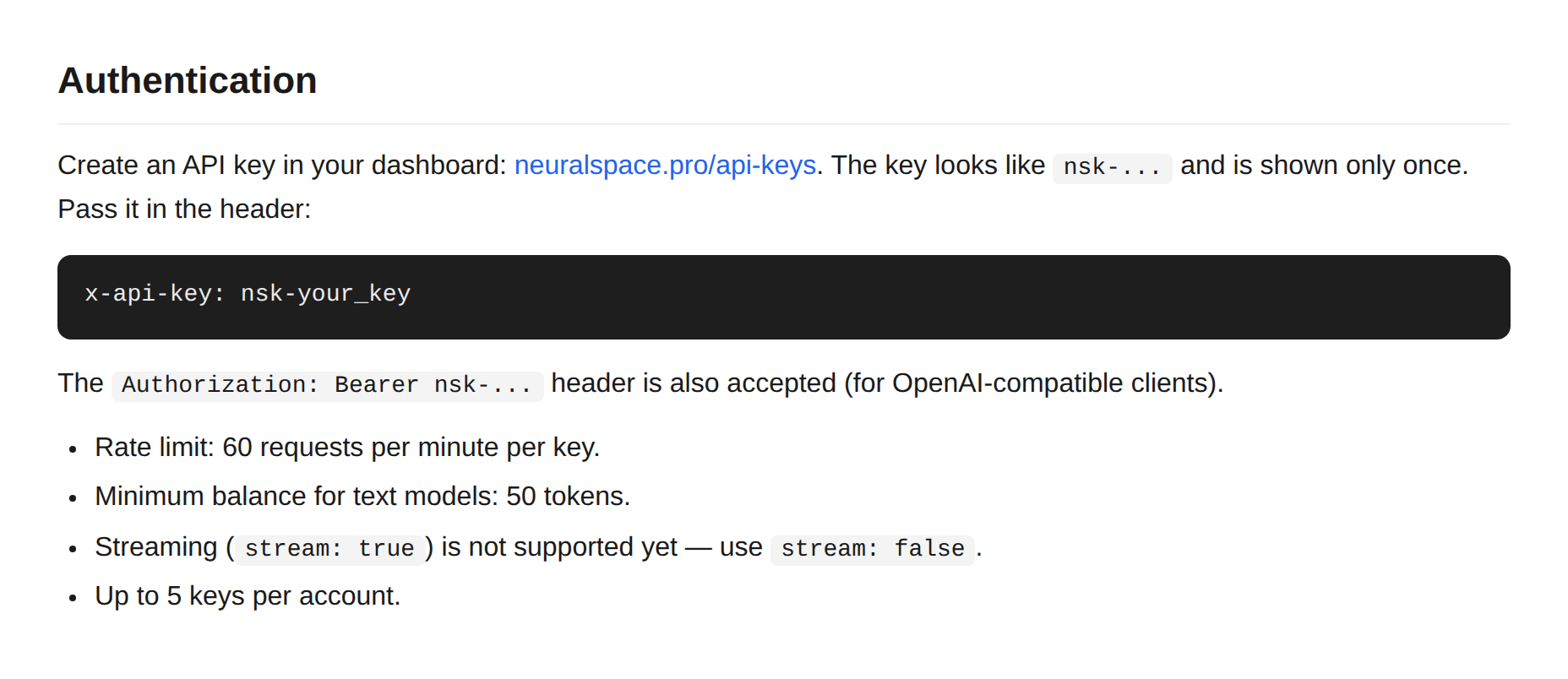
Once you confirm, the key is shown exactly once, the assistant writes it into the project's .env itself and keeps coding. In the chat history the key is stored as [hidden] and never leaks anywhere. And we tuned the assistant's prompt — it now knows about our public API and offers it on its own whenever the code needs a neural network.
Where's the catch
Honest about the limits, so there are no surprises later:
- Up to five keys per account. Plenty, but you can't spawn them forever.
- 60 requests per minute per key. More than enough for a bot or a pet project; plan ahead for a busy production app.
- Streaming (
stream: true) isn't wired up yet — the response comes back in one piece. - At least 50 tokens on the balance, otherwise text models won't let you in.
- The key is shown once. Lost it — issue a new one, revoke the old.
Images and video work asynchronously: you create a task, poll the status, fetch the result. The docs include ready-made polling-loop examples for exactly this — in curl, Python and Node. Copy, paste, go.
What it costs
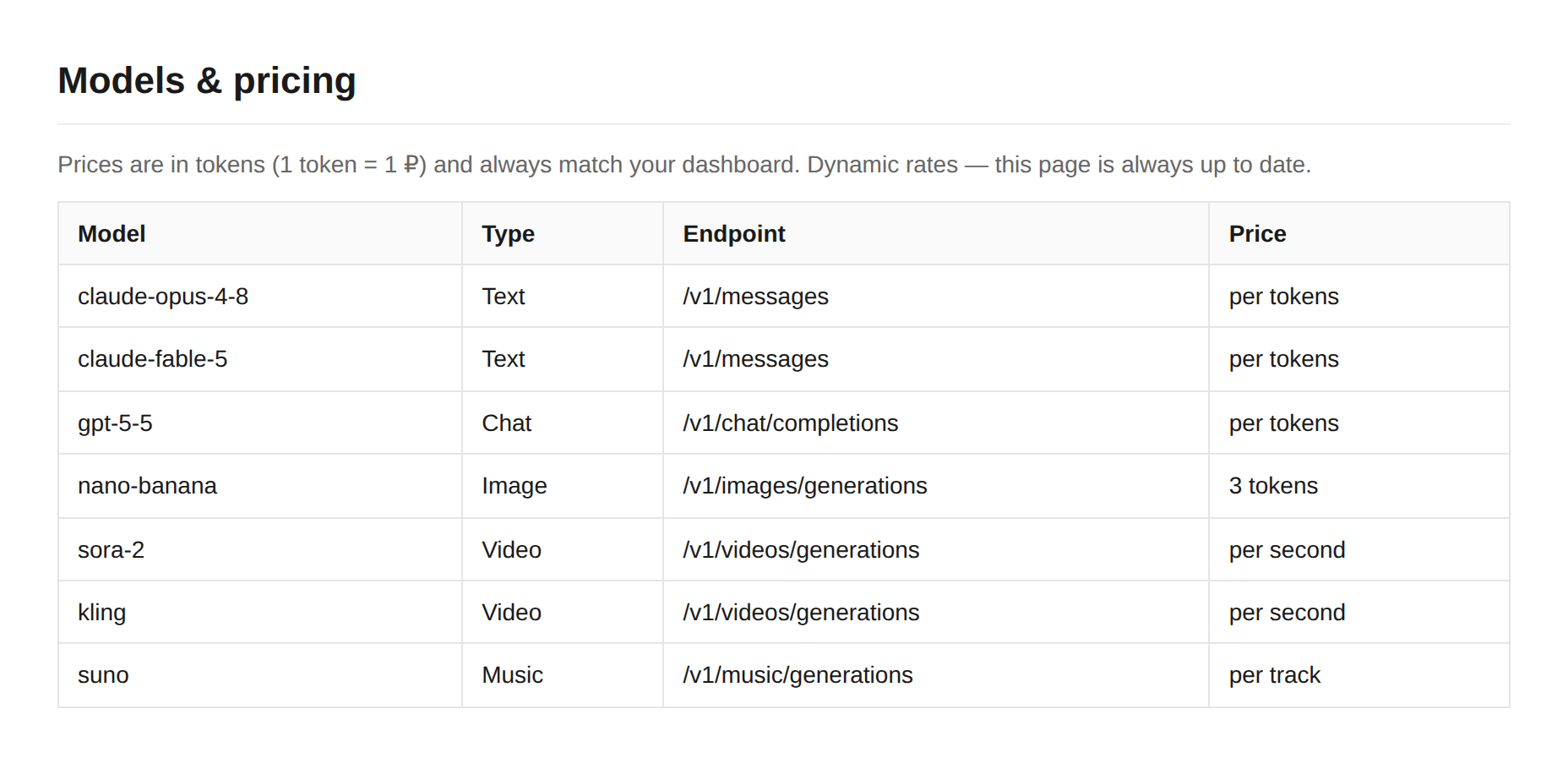
Prices are in tokens, and they honestly match the ones in your dashboard. No separate "API markup". Claude, GPT-5.5, Nano Banana, Sora 2, Kling, Suno — all in one table, topped up in rubles with any card. Rates are dynamic: the docs page always shows the current ones.
The short version: open neuralspace.pro/v1/docs, copy an example, ask the assistant in the Code section to issue a key — and a minute later your app is already chatting with a neural network. No foreign cards, no proxy dance.
Часто задаваемые вопросы (FAQ)
Вопрос: Как получить лучший результат от нейросети?
Ответ: Используйте подробные промпты (описания) на английском языке, задавайте стиль и детали сцены.
Вопрос: Можно ли использовать эти материалы в коммерческих целях?
Ответ: Да, сгенерированный контент полностью принадлежит вам.