Trends & presets marketplace on NeuralSpace: how to earn from your prompts
Коротко о главном (BLUF)
В этом материале мы разбираем ключевые аспекты работы с нейросетями: актуальные модели, практические советы по промптам и примеры генераций. Читайте дальше, чтобы узнать подробности.
So, we shipped the thing we'd been itching to build for ages. On NeuralSpace you can now not only spend money on generations — you can earn it too. There's a new section where you sell your own presets, prompts, references and trends to other users. Caught a wave first, dialled in the right model — publish it and get paid for every single use. Sounds simple, but there's a whole new chunk of the platform behind it.
Last time I dashed off a quick announcement and, honestly, oversold it in places. I wrote, for instance, that you could package music and chat scripts into a preset. Not yet. At launch the marketplace works with things that have a result image and a clear "model + prompt + references" bundle: that's image generation and video. So let's go through what the section actually does, how much you can pull from it, and how to publish your first trend in five minutes.
What the trends & presets marketplace is
Picture this: you spent a week tuning a generation — picking the prompt, testing models, fiddling with references — and out came a style that just hits. Before, that know-how stayed with you and only you. Now you package it into a trend and put it up for everyone.
Someone else comes along, sees your result, attaches their own photo, taps "Repeat trend" — and pays you. They skip your whole trial-and-error journey and get the finished thing. You get money for thinking hard once. And it keeps happening with every generation made from your trend — for as long as people use it.
It works for images and for video. Anywhere a generation has a prompt, a model and (optionally) references, there's something to package and sell.
How much you earn: price and percentages
The in-platform currency is tokens, and the rate is dead simple: 1 token = 1 ₽. The price a buyer pays is two parts — the cost of the generation itself plus your markup. You pick the markup from four presets, and it directly decides how much lands in your pocket.
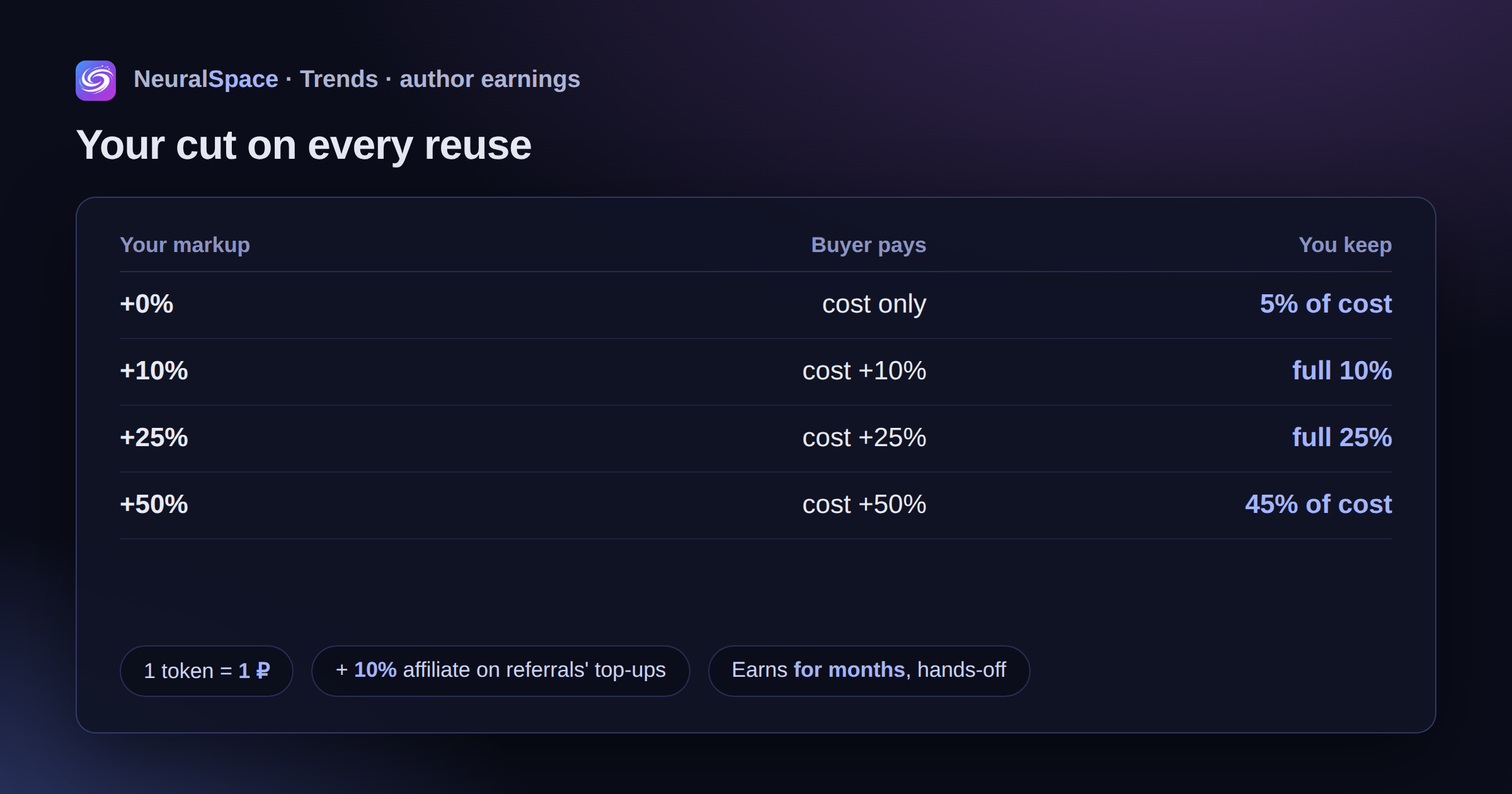
Here's how it's counted on every generation made from your trend:
- 0% markup — the buyer pays exactly the cost, and the platform still credits you 5% of it. So even a trend that's free for others earns you something.
- 10% markup — you take the full 10%.
- 25% markup — you take the full 25%.
- 50% markup — that's the max, and here the platform takes its 5 percentage points of commission, leaving you 45% of the cost.
The logic is fair: on small and mid markups the platform doesn't touch your earnings at all — the commission only kicks in on the fattest rate. One good trend with a steady stream of reuses brings in money for months, with zero effort from you.
Show it, or hide it
This bit is the tastiest part, I reckon. When you publish, you decide what the buyer sees. You can hand over everything in the open: here's the model, here's the prompt, here are the references, go figure it out. Or you can hide the recipe — the person uses the result but never sees which prompt is inside or what references you fed it.
Hiding the prompt is one checkbox. Then come the references, and here it's a touch subtler. Each reference can be marked required — then it's automatically mixed into the buyer's generation, and that same one can be hidden (you're only allowed to hide required ones — makes sense, otherwise it's unclear what's being mixed in). Optional references show up as an example for the buyer to swap with their own.
Why hide it? If you've found a genuinely strong combo that's hard to reproduce, there's no point giving the recipe away for free. The buyer pays for access to the result, not to copy your kitchen and never come back. Some people will do the opposite and open everything up — for reputation and followers. Your call.
One more checkbox — "allow appending to the prompt". Turn it on and the buyer can add their own text to yours (even to a hidden prompt) without seeing the original. Handy when the style is one thing but everyone's storylines differ.
Affiliate percentages: a second income stream
And here's something I barely covered in the announcement. Every trend of yours has a direct link, and your referral code is already baked into it. Anyone who comes through that link and signs up is locked to you forever. After that the affiliate programme kicks in, and that's separate money on top of your markup: you get 10% of all their top-ups — for the entire time they use the platform. Not once, but on every payment, no matter how much the person spends.
So one good trend works in two directions at once: you earn on generation reuses and at the same time bring in paying users who drip an affiliate cut. The balance can be withdrawn to USDT (TRC20) or by bank transfer, or converted back into tokens — and on conversion there's a +10% bonus from 500 ₽ and +20% from 2000 ₽.
Trends: first to publish, first to earn
You know that feeling when a new format goes viral in your feed and you just can't reproduce it? The trends section is exactly about that. If you caught a format first, or invented your own, you package it as a trend, and after moderation it joins the shared feed. Anyone who wants to jump on the topic fast grabs the ready-made thing instead of guessing.
Speed matters here. Trends don't live long, sometimes a couple of weeks. Whoever packages first collects the bulk of the revenue. Too late, and the market gets flooded with lookalikes and the price slides. The feed, by the way, has sorting: "New", "Popular" and "Top authors" — the last one's handy for seeing who's actually climbing on this.
Tutorial: publish your trend in 5 minutes
No separate dashboard needed — it all starts right from your generations. Step by step.
Step 1. Find the "Share" button
Open your generations (images or video). Hover over any of your works — a round arrow "Share" button appears in the top-left corner of the card. Click it and the trend editor opens.
One important catch: a trend can only be built from a fresh generation — its references are stored for 7 days. If the work is more than a week old, the source files are already cleaned up and you won't be able to package it. So if a result catches your eye, package it right away.
Step 2. Set up the trend
The "Share a trend" window opens. It has everything we talked about above:
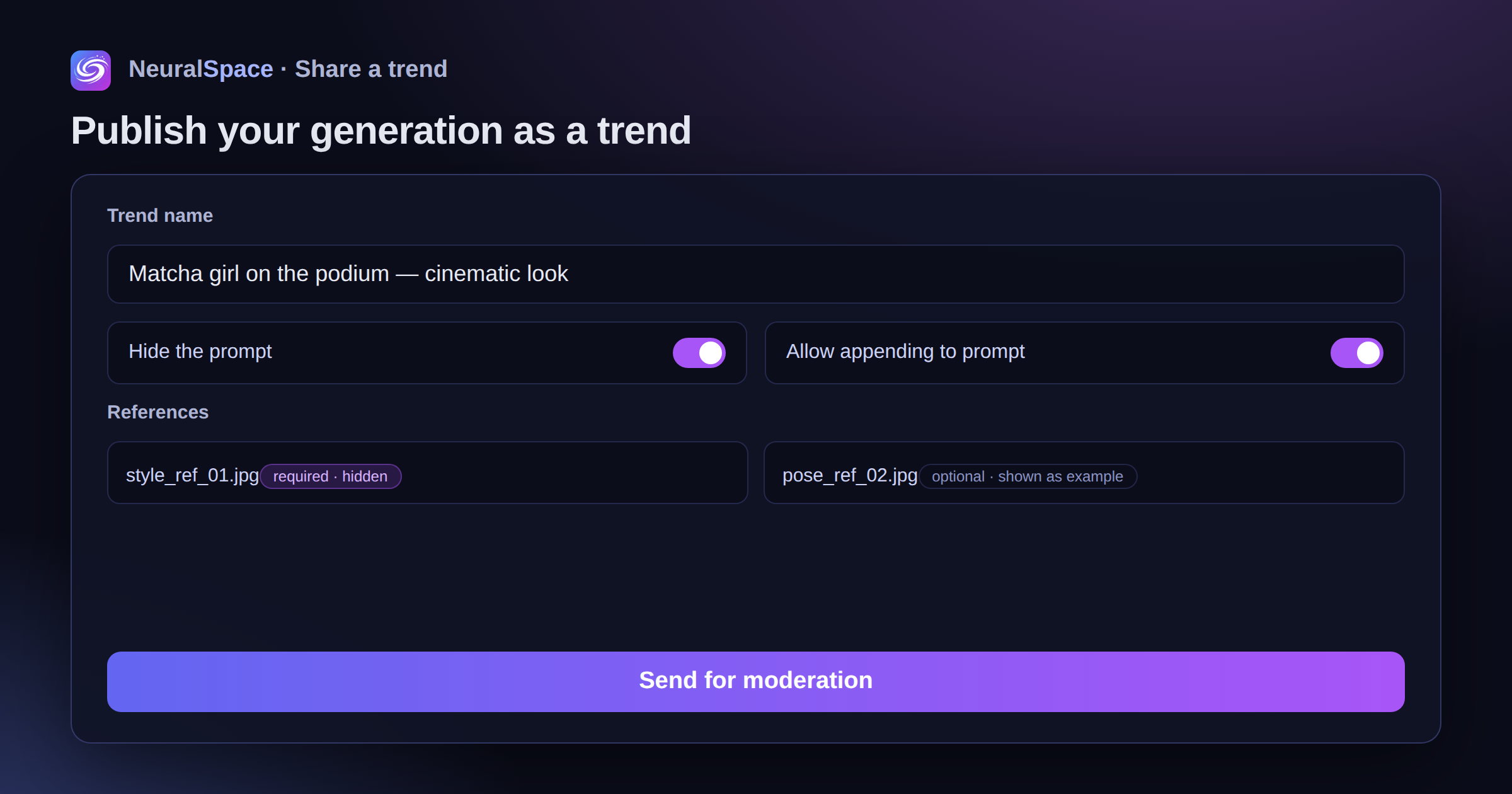
- Name — short and to the point, it's how people find you in the feed.
- Hide the prompt — whether to hide the text from buyers.
- Allow appending to the prompt — whether to let people add their own text.
- References — mark the required ones and hide them if you like. Required ones get mixed in automatically.
- Comment — a short instruction: which photo to attach, what to keep in mind. It massively raises the odds people get it right on the first try.
At the top, by the way, sits your direct referral link — copy it and drop it on social media. It goes live once the trend is approved.
Step 3. Pick your markup
Right under the comment are those presets — +0 / +10 / +25 / +50%. The platform immediately shows how much you'll get per generation. Not sure? Start at 10–25% and adjust by demand later: you can change the display settings and the markup even on an already-published trend.
Step 4. Send it for moderation
Hit "Send for moderation". The trend first goes through an AI moderator — if it's clean, it publishes almost instantly. If the AI has doubts, the trend goes to a manual queue and a human reviews it. You can submit up to 5 trends a day — an anti-spam limit. The status ("Draft", "In moderation", "Published") is always visible right in the editor.
Once approved, the trend joins the shared feed and buyers see its card. Here the person sees your result, the price in tokens, the likes, your comment, and the open references as an example. They attach their own photo and tap "Repeat trend". The prompt and required references, if you hid them, stay under the hood. Want to pull a trend? One "Remove from trends" button, and putting it back is just as easy — no re-moderation needed.
What you should know (the section's in beta)
Let's be honest: the section's still in beta, a few things are getting polished. A couple of points so there are no surprises:
- the marketplace works with images and video — music and chat scripts can't be packaged yet;
- generation references live 7 days, so build trends from fresh work;
- moderation is partly manual, so sometimes you'll wait a bit;
- the monetisation interface is still changing — if something breaks, drop us a line.
But the basics already work at full strength: you can publish a trend, pick a markup, and collect payouts and affiliate percentages right now.
Who's this actually for
If you generate an avatar once in a blue moon — probably not for you. But if you're the type who spends hours polishing a result to perfection, runs a blog about neural nets, or makes content to order — this is a straight way to recoup the time you spent. I didn't believe people would pay for someone else's prompts myself, until I saw the first sales in testing. They pay. Especially for the stuff that saves hours of fiddling.
So go take a fresh look at your old generations. You might already have a finished product sitting there and not even know it. Sign up and give it a go.
Часто задаваемые вопросы (FAQ)
Вопрос: Как получить лучший результат от нейросети?
Ответ: Используйте подробные промпты (описания) на английском языке, задавайте стиль и детали сцены.
Вопрос: Можно ли использовать эти материалы в коммерческих целях?
Ответ: Да, сгенерированный контент полностью принадлежит вам.